Technique developed to evade traditional spam filters seen in over a million retail-themed phishing scams
Key takeaways
- Barracuda researchers have detected more than one million phishing attacks using text-salting techniques designed to fool both traditional and AI-powered email security systems.
- Hidden text can manipulate how AI security tools interpret an email, while generative AI makes text-salting campaigns cheap, scalable and highly varied.
- Modern email security must analyze what users actually see, not just the raw email source code, to detect hidden-content evasion techniques.
Evasion tactics developed to bypass traditional spam filters have mutated to confuse modern AI-powered email security systems. Barracuda researchers have detected more than a million attacks since April, part of a retail-themed phishing attack promising rewards, points, gift cards, or urgent redemption offers.
How we got here
Traditional spam filters work by scoring emails on the prevalence of unwanted or malicious terms. Hiding large amounts of harmless-looking text inside an email that can only be seen by security tools helps to dilute the concentration of “bad” words. This makes the emails look benign and legitimate, while the recipient sees only the intended phishing content.
The techniques used to hide content are known as “text salting.”
Over the last year, researchers have seen an escalation in the use of text salting to confuse not just language detection and keyword analysis, but also machine learning models and, increasingly, LLM-based security tools into misclassifying phishing or spam messages as legitimate and allowing them to be delivered to recipients.
The attack flow
Trusted infrastructure
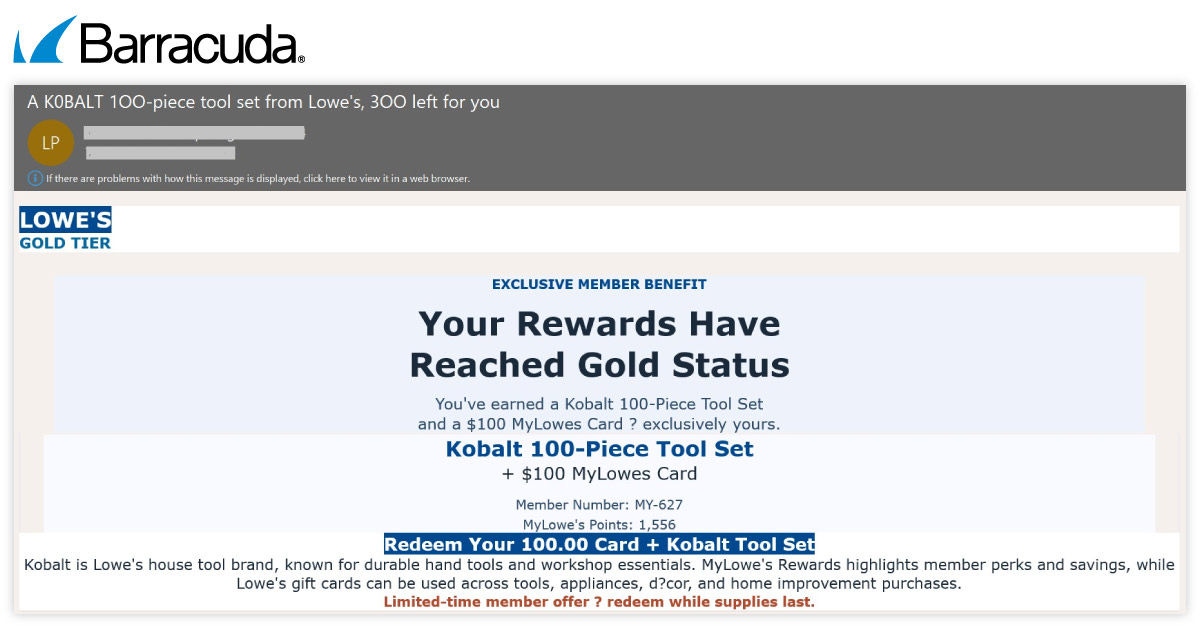
Sample retail-themed phishing email
The attacks analyzed by Barracuda researchers involve compromised legitimate websites or lookalike domains. These attacker-controlled domains are configured with industry-standard email authentication protocols, specifically DKIM for authentication and legitimacy.
Secure email gateways scan incoming message content and estimate the probability that a message is spam or phishing. Using text salting, the attackers deliver a poisoned payload containing both visible phishing content and hidden benign text.
The hidden content includes random stories, generic conversation or project-style notes, adding high counts of words such as puppy, training, notes, task, rhythm, and book to reduce the impact of suspicious words such as rewards, expires or card.
Meanwhile, the visible message features an urgent retail-themed lure, such as expiring rewards, points or gift card offers, and includes a malicious call to action.
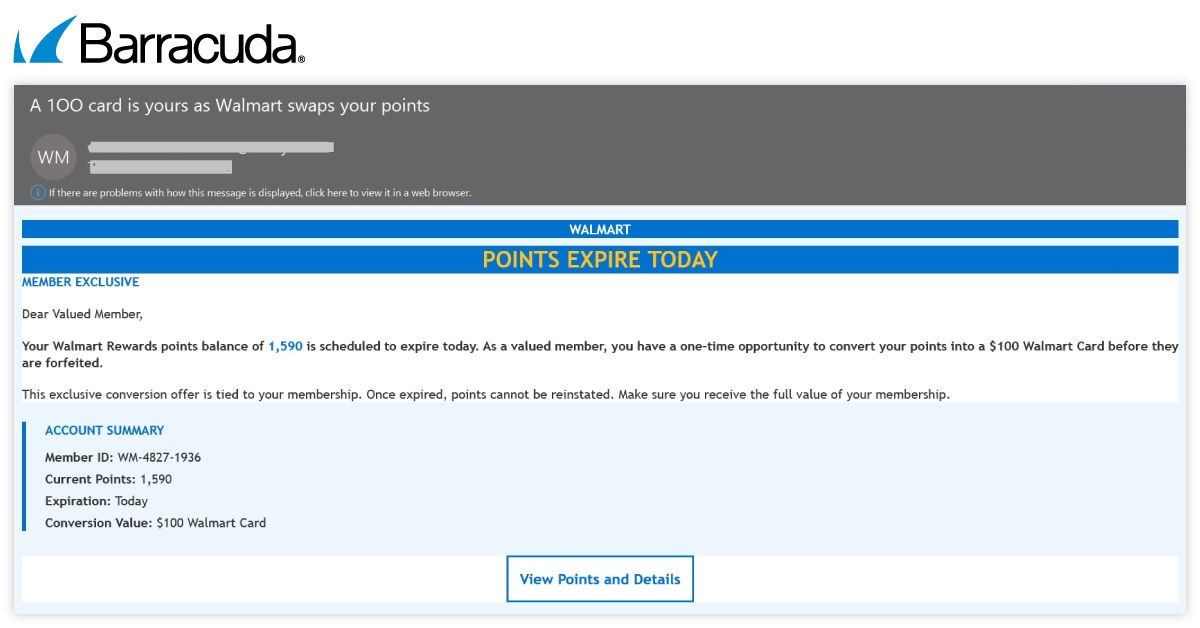
Sample retail-themed phishing email
Technical details
Modern security tools will often “force” hidden text to show up so they can read it. To beat this, attackers are using multiple concealment techniques, so that even if one is detected the others will keep the copy hidden — similar to locking a door with three different deadbolts instead of just one.
Attackers use Cascading Style Sheets (CSS) to crop the viewing window for the filler text:
- The instruction “clip-path: inset (100%)” tells the browser to crop the relevant viewing window by 100% from all sides. This shrinks the visible area for the clip down to absolute zero.
- The instruction “max-height:0 & line-height:0” ensures that if the browser fails to comply with the first instruction, the vertical height of the text block is zero. This means there are no odd gaps that might look suspicious to email recipients.
They also issue commands that move the hidden copy out of the visible screen
- “text-indent: -9999px” indents the first line of text by a massive negative value, so that the text appears around 10,000 pixels to the left of the screen boundary.
- “Overflow: Hidden” helps to keep the text out of sight by ensuring the browser does not add a horizontal scrollbar to the bottom of the email.
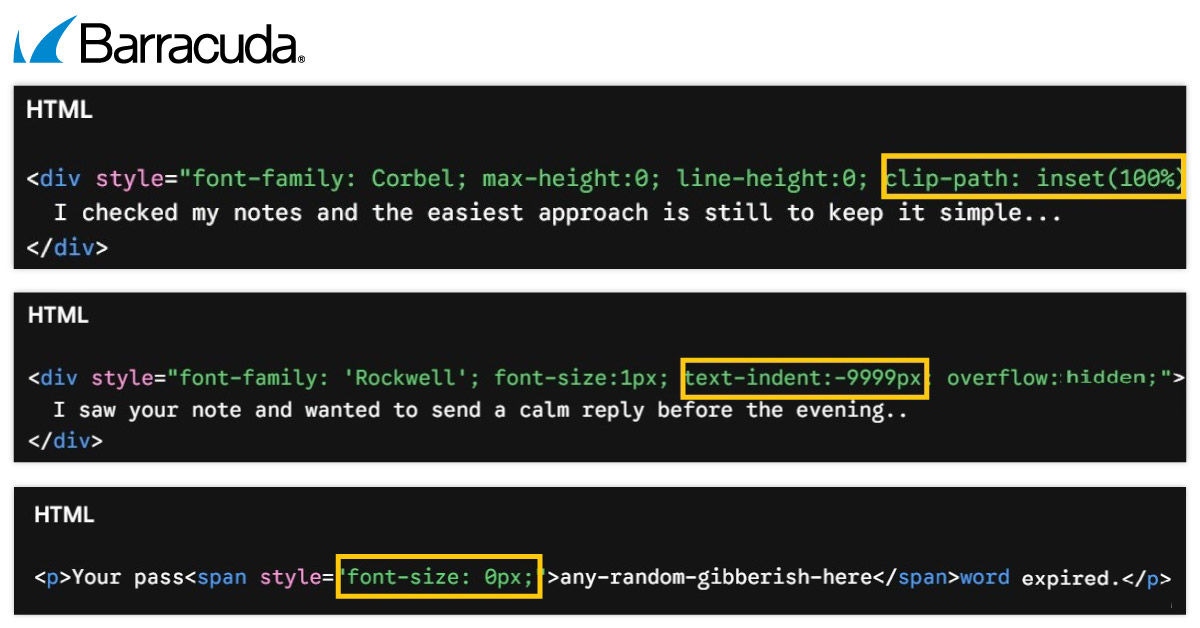
CSS code instructions to shrink viewing window, move text out of viewing window and shrink font size to zero
The Zero Font technique
Attackers also use font attributes to make malicious or misleading text invisible to security tools but visible to the end user.
Examples include:
- Injecting disruptive text directly into words or sentences with their font size set to zero.
- Breaking up HTML streams with non-standard terms to evade signature-based filters looking for exact phrases. For instance, the HTML text could read “Your pass [random text] word expired.” Scanners looking for the phrase “Your password expired” will fail to trigger.
- Because the inserted random text has a font size of zero, it is not visible to the user who just sees: “Your password expired.”
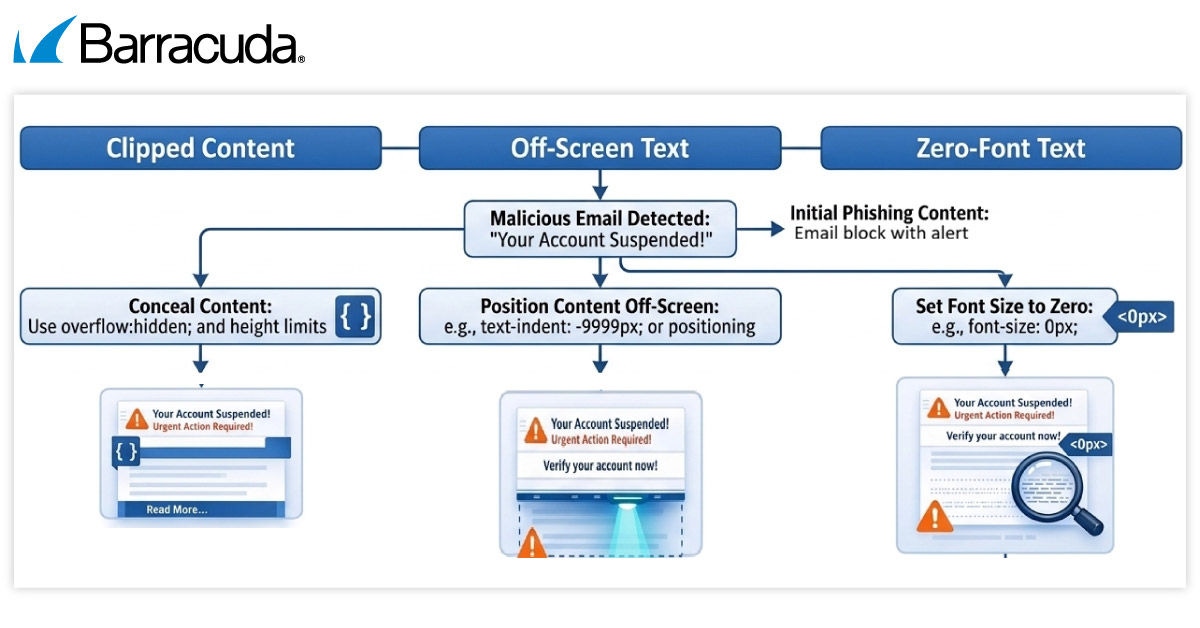
AI-generated summary of text salting techniques
What makes AI-powered email security systems vulnerable to these techniques
Text salting and related techniques can be used to confuse AI-driven content analysis engines by flooding the email with random terms that encourage the AI system into making an incorrect classification decision.
Hidden text can alter how a large language model (LLM) interprets an email, shifting the model’s assessment of the email’s intent, sentiment, purpose, and risk level
LLMs often process the raw text and email source code without knowing what text is invisible to the user unless they have been specifically trained or instructed to ignore hidden content.
As a result, the model can be influenced by information that a human recipient never sees.
Ironically, AI is itself driving an escalation in the use of these techniques.
- AI makes it easier and faster for attackers to automatically create endless, normal-sounding paragraphs about random topics for free. Every single phishing email can be completely different, making them impossible to track.
- It allows a dangerous 20-word link to be hidden inside a 400-word invisible story that appears safe and positive, tricking the security AI.
How to stay safe
Organizations should use a layered approach rather than relying solely on keyword detection.
This involves strengthening email security analysis with controls that can evaluate message structure, sender reputation, behavioral anomalies, authentication results, embedded links, HTML-rendering techniques, and the user-visible content.
Deployed security tools should be able to detect and expose hidden-content abuse and differences between the user-facing message and underlying source code.
These recommendations should be underpinned by regular email threat awareness training for employees, helping them to spot the latest warning signs.
Barracuda Email Protection helps protect customers from hidden-text phishing techniques by applying layered email security controls across the full message lifecycle.






Iscriviti al blog di Barracuda.
Iscriviti per ricevere i Threat Spotlight, commenti del settore e altro ancora.