
Come utilizzare il portale API BarracudaONE
Una guida pratica per integrare i dati di BarracudaONE nelle operazioni di sicurezza e nei flussi di lavoro dei servizi
Conclusioni
- Il BarracudaONE API Portal fornisce un modo centralizzato per accedere ai dati della piattaforma e integrarli negli strumenti di sicurezza e operativi esistenti.
- I team IT e i MSP possono utilizzare le API per migliorare la visibilità, automatizzare i flussi di lavoro di risposta e scalare la reportistica attraverso gli ambienti.
- Seguendo le best practice API, le organizzazioni possono creare integrazioni flessibili che si evolvono con le loro esigenze di sicurezza.
I team di sicurezza e i provider di servizi gestiti (MSP) sono spesso sotto-risorse. Ci si aspetta che monitorino più segnali, rispondano più rapidamente e applichino politiche coerenti in ambienti sempre più complessi, spesso senza aggiungere personale o strumenti. Soddisfare questi requisiti è quasi impossibile senza integrazione, automazione e accesso affidabile ai dati della piattaforma. Il BarracudaONE API Portal fornisce un unico punto di ingresso unificato per interagire con <bpt id="9"><a href="https://www.barracuda.com/products?utm_source=02052026&utm_medium=blog&utm_campaign=blog" target="_blank" rel="noopener noreferrer"></bpt>BarracudaONE<ept id="9"></a></ept> tramite API (interfacce di programmazione delle applicazioni). Consente ai team IT e agli MSP di integrare le informazioni di BarracudaONE negli strumenti che già utilizzano.
Cos'è BarracudaONE?
BarracudaONE è <bpt id="3"><a href="https://blog.barracuda.com/2025/06/02/introducing-the-new-barracudaone-ai-powered-cybersecurity-platfo" target="_blank" rel="noopener noreferrer"></bpt>una piattaforma di sicurezza informatica basata su IA<ept id="3"></a></ept> che unisce la protezione di e-mail, dati, applicazioni e rete con rilevamento e risposta estesi (XDR). Piuttosto che operare come strumenti isolati, queste capacità sono unificate per fornire visibilità coerente, intelligenza condivisa e operazioni semplificate attraverso gli ambienti.
La piattaforma è facile da acquistare, distribuire e utilizzare, aiutando le organizzazioni ad adottare una sicurezza completamente configurata senza rallentare il tempo di produzione. Il BarracudaONE API Portal arricchisce questa esperienza consentendo l'integrazione dei dati della piattaforma nei flussi di lavoro operativi esistenti. Funziona come gateway centrale per l'accesso programmatico a BarracudaONE.
<bpt id="3"><b></bpt>Monitoraggio e visibilità centralizzati della sicurezza: <ept id="3"></b></ept>Raccogli i dati sulla salute del prodotto e sugli avvisi in strumenti di monitoraggio centralizzati per ridurre la necessità di dashboard aggiuntivi.
<bpt id="3"><b></bpt>Orchestrazione della sicurezza e risposta automatizzata (SOAR): <ept id="3"></b></ept>I team di sicurezza integrano gli avvisi BarracudaONE nei flussi di lavoro automatizzati per standardizzare la risposta e ridurre il triage manuale.
<bpt id="3"><b></bpt>Ticketing, reportistica e erogazione dei servizi per i MSP: <ept id="3"></b></ept>I MSP utilizzano l'API per automatizzare la creazione di ticket basata su avvisi, la creazione di ticket basata su reportistica dei clienti, la reportistica dei clienti e il monitoraggio degli SLA tra i tenant.
<bpt id="3"><b></bpt>Reportistica personalizzata e visibilità esecutiva: <ept id="3"></b></ept>I team aggregano i dati di BarracudaONE con altri segnali di sicurezza per creare dashboard specifici per ruolo per gli analisti del centro operativo di sicurezza (SOC), dashboard specifici per i team IT e per i dirigenti.
I provider di servizi gestiti (MSP) e i team IT possono adattare i dati della piattaforma ai loro ambienti e flussi di lavoro esistenti. Con le integrazioni API, i team di sicurezza possono personalizzare il monitoraggio, l'automazione, la reportistica e la visibilità per soddisfare le loro esigenze operative e di scalabilità.
Utilizzo del portale API BarracudaONE
Ecco una guida passo-passo su come utilizzare il portale:
Accesso al portale API
- Accedi a BarracudaONE
- Apri <bpt id="3"><b></bpt>Impostazioni globali<ept id="3"></b></ept> dalla navigazione in basso a sinistra
- Seleziona <bpt id="3"><b></bpt>API Portal<ept id="3"></b></ept>
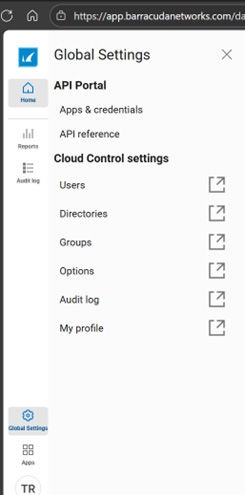
Menu di navigazione del dashboard BarracudaONE
Da qui, puoi gestire applicazioni e credenziali e accedere alla documentazione API.
Crea un'applicazione
Naviga su <bpt id="3"><b></bpt>Apps and Credentials<ept id="3"></b></ept> all'interno del portale API <bpt id="8"><a></bpt><ept id="8"></a></ept><bpt id="12"><a></bpt> <ept id="12"></a></ept> e crea una nuova applicazione. Scegli un nome chiaro e orientato allo scopo, come 'Product Health State API'. Un nome che identifichi il sistema o il flusso di lavoro pertinente aiuterà a mantenere le app gestibili e facili da comprendere.
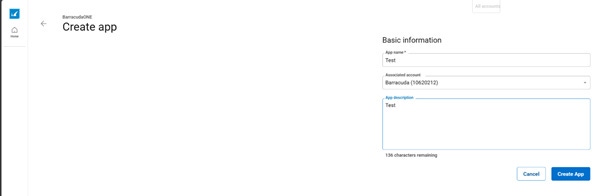
BarracudaONE API Portal
Creare applicazioni separate per diversi ambienti (come sviluppo, test e produzione) aiuta a mantenere una separazione pulita e semplifica la risoluzione dei problemi.
Recupera le credenziali API
Una volta creata l'applicazione, selezionala per visualizzare il <bpt id="3"><b></bpt>Client ID<ept id="3"></b></ept> e il <bpt id="8"><b></bpt>Client Secret<ept id="8"></b></ept>. Queste credenziali vengono utilizzate per autenticare le richieste API.
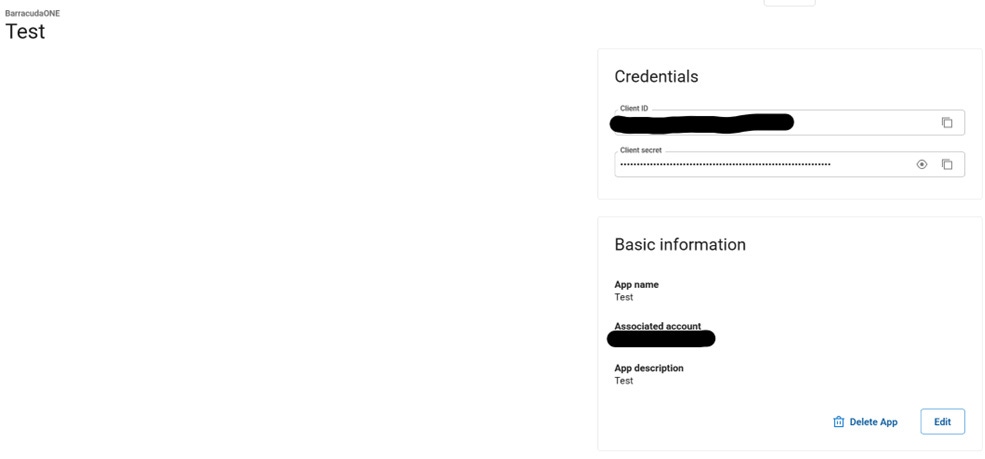
BarracudaONE API Portal
Tratta le credenziali API come segreti sensibili:
- Conservali in un gestore di segreti sicuro
- Limitare l'accesso in base al ruolo e alla responsabilità
- Ruota le credenziali secondo le politiche di sicurezza della tua organizzazione.
Esplora la documentazione API
Il portale API include documentazione di riferimento integrata compatibile con OpenAPI. Dalla pagina delle app, è possibile accedere alla documentazione che consente di:
- Sfoglia gli endpoint disponibili
- Esegui richieste di test interattive
- Scarica la specifica OpenAPI
- Genera frammenti di codice per linguaggi e strumenti comuni
Questo semplifica la convalida delle richieste e l'integrazione delle API nei flussi di lavoro di sviluppo esistenti.
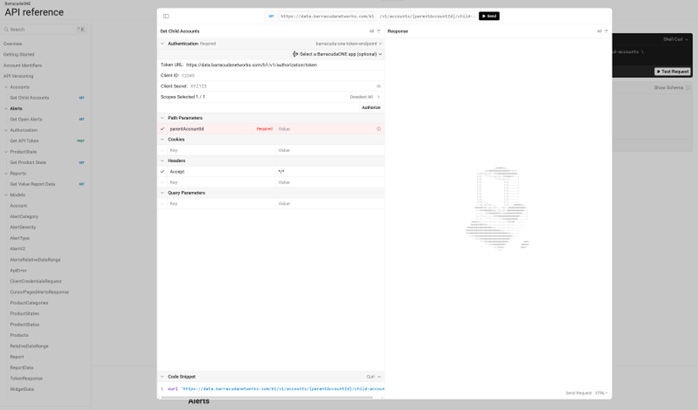
documentazione del portale API Barracuda
Effettua la tua prima chiamata API
- Utilizza la documentazione interattiva per emettere una richiesta di test o importare la specifica OpenAPI appropriata nel tuo client API.
- Esegui una richiesta di test a un endpoint di sola lettura, come la salute del prodotto o gli avvisi. Conferma l'autenticazione, la struttura della risposta e la gestione degli errori.
- Dopo la conferma, collega le risposte API ai sistemi a valle come le piattaforme SOAR e altri strumenti di monitoraggio e reporting.
Una best practice comune è convalidare le integrazioni in un ambiente non di produzione prima, quindi promuoverle in produzione utilizzando credenziali separate.
Segui le best practice API
I team che ottengono il massimo valore dal BarracudaONE API Portal seguono tipicamente alcune pratiche chiave:
- Applica l'accesso con privilegi minimi limitando chi può visualizzare o gestire le credenziali API
- Standardizzare la normalizzazione dei dati affinché campi come timestamp, severità e identificatori siano allineati con gli schemi esistenti
- Inizia con i casi d'uso di visibilità prima di espanderti in un'automazione più approfondita
- Documenta i flussi di lavoro in modo che le integrazioni siano facili da mantenere e da introdurre ai nuovi membri del team.
Guida per gli sviluppatori
Per gli sviluppatori, il BarracudaONE API Portal è progettato per integrarsi naturalmente nei flussi di lavoro di ingegneria moderni. Considerazioni chiave:
- Utilizzare applicazioni API separate per sviluppo, test e produzione
- Importa la specifica OpenAPI negli strumenti preferiti per la convalida e la generazione del client
- Normalizza le risposte API in anticipo per semplificare la correlazione e l'analisi
- Progettare integrazioni modulari ed estensibili, in modo che possano evolversi man mano che diventano disponibili ulteriori funzionalità.
- Tratta il portale API come una base di integrazione stabile piuttosto che come una soluzione puntuale. Crea flussi di lavoro che possano crescere senza richiedere una nuova architettura.
Guida per i MSP
Per i MSP, il Portale API supporta operazioni coerenti e scalabili su più clienti. Vantaggi principali:
- Visibilità centralizzata negli ambienti dei clienti
- Workflow standardizzati per la reportistica e il monitoraggio
- Ridotto sforzo manuale per controlli di routine e revisioni dello stato
- Produttività migliorata dei tecnici e allineamento SLA
- Onboarding più semplice man mano che il numero di clienti e le offerte di servizi crescono
Utilizzando le API invece dei processi manuali, i Managed Service Provider possono offrire un servizio più coerente liberando il personale per concentrarsi su lavori di maggior valore.
Prova BarracudaONE oggi
Centralizzando l'accesso ai dati della piattaforma, le aziende possono adattare BarracudaONE al loro ambiente invece di cambiare il loro modo di lavorare. Questa flessibilità rende più facile iniziare ed estendere le integrazioni nel tempo.







Rapporto sul divario di competenze nella sicurezza informatica: il rischio dell’IA è in cima alla lista
Un sondaggio di Barracuda Research condotto tra 2.000 responsabili della sicurezza rileva che il 94% segnala carenze di competenze nella sicurezza informatica, mentre l’IA riduce i ruoli entry-level nella sicurezza che contribuiscono a formare i futuri investigatori.
Iscriviti al blog di Barracuda.
Iscriviti per ricevere i Threat Spotlight, commenti del settore e altro ancora.